How to Create a Construction Schedule: Step-by-Step Guide
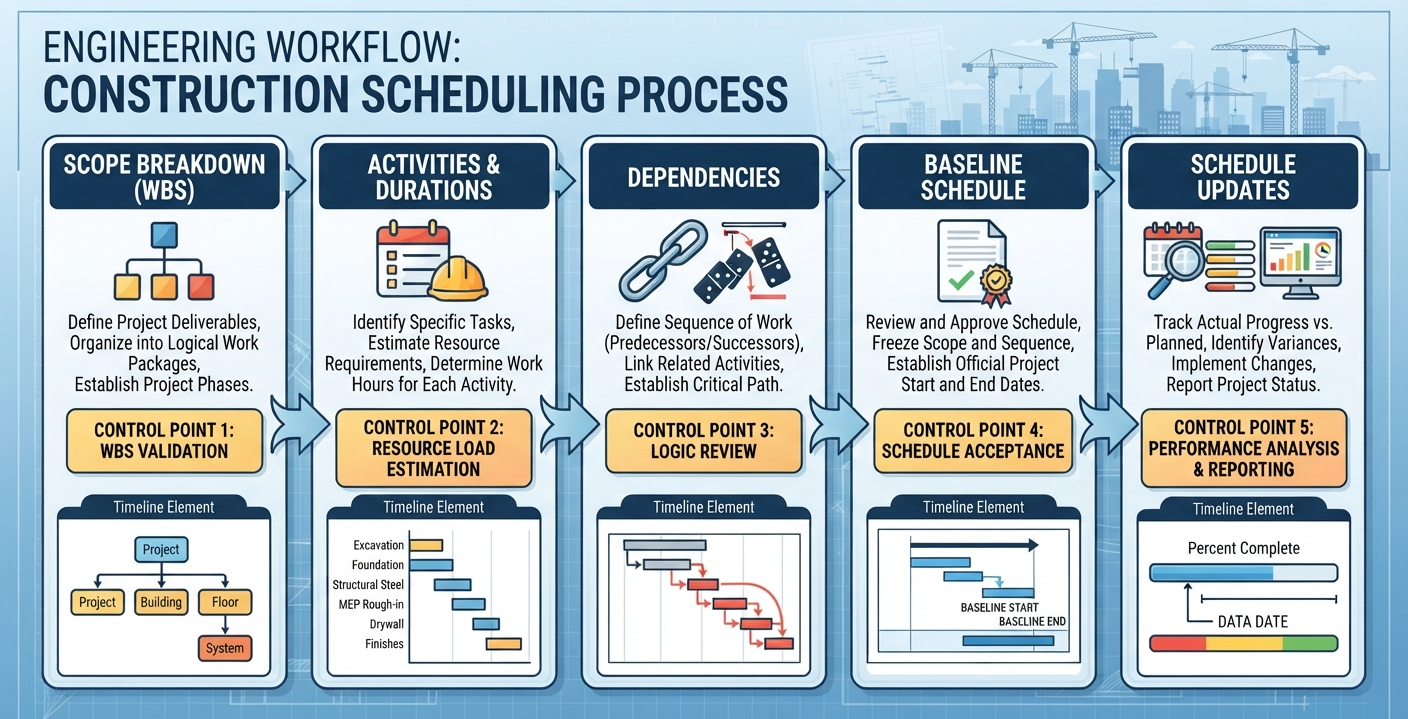
How to create a construction schedule?” is a frequently asked question. The answer is simple. Define the project scope, break the work into activities, estimate durations, sequence the tasks by dependencies, assign resources and crews, and then load everything into scheduling software to build a critical path timeline. From there, baseline the schedule, monitor progress weekly, and update it as conditions change.
The following guide explains how to create a construction schedule step by step, following the approach of an experienced scheduler, because a poorly built schedule from day one can cost you time and money throughout the project.
Why Learning How to Create a Construction Schedule Matters for Contractors
A construction schedule is not paperwork. It is a financial control document. Labor represents a significant portion of construction project costs, making workforce coordination and productivity essential to project performance. When trades are scheduled out of sequence or crews wait for inspections, material deliveries, or other activities, labor efficiency can suffer.
On commercial jobs in the US, owners and construction managers increasingly require a CPM (Critical Path Method) schedule before the first mobilization. On smaller residential and light commercial jobs, even a simple two-week look-ahead schedule will separate you from contractors who are constantly reacting instead of planning.
Learning how to create a construction schedule properly gives you three things:
- Predictability: You know when concrete, steel, MEP rough-ins, and finishes actually happen.
- Leverage: If a client delays a decision, you can show exactly which downstream activities slide and what it costs.
- Cash flow: Billing milestones tied to a real schedule mean faster, cleaner pay applications.
Step 1: Define the Scope and Gather Your Inputs
Before you open any software, pull together everything the schedule depends on:
- Contract documents, drawings, and specifications
- The permit and inspection requirements for your jurisdiction
- Subcontractor availability and quoted durations
- Material lead times (this alone kills more schedules than weather)
- Owner decisions and long-lead procurement items
Practical Example: Consider a 12,000 sq. ft. commercial build in Texas where the project manager discovers the structural steel has a 14-week fabrication lead time, but only after drafting the schedule. That single input reshapes the entire sequence: steel has to be released for fabrication before the foundations are even poured, or the frame sits waiting three months.
Write the scope boundaries down. What is in the schedule, and what is excluded (e.g., owner-furnished equipment, utility company work)? Ambiguity here becomes disputes later, and it is the first thing to nail down when figuring out how to create a construction schedule that holds up in the field.
Step 2: Build a Work Breakdown Structure (WBS)
Break the project into phases, then into individual activities. A good WBS for a typical ground-up project looks like this (durations are illustrative and vary by project):
| Phase | Example Activities | Typical Duration (illustrative) |
|---|---|---|
| Pre-construction | Permits, mobilization, temp utilities | 2 to 4 weeks |
| Sitework | Excavation, utilities, grading | 3 to 8 weeks |
| Foundations | Footings, slabs, waterproofing | 4 to 6 weeks |
| Structure | Framing or steel erection, concrete | 6 to 12 weeks |
| Building Envelope | Roofing, windows, façade | 4 to 8 weeks |
| MEP Rough-In | Mechanical, electrical, plumbing | 6 to 10 weeks |
| Finishes | Drywall, flooring, fixtures, punch list | 8 to 14 weeks |
Keep activities at the right level of detail. Too broad (“build building”) tells you nothing. Too granular (“install hinge on door 204”) makes the schedule impossible to maintain. A practical rule: no activity should be longer than about two weeks, and each should have one clear responsible party.
Step 3: Estimate Durations Realistically
This is where most schedules fail. Contractors estimate durations based on best-case conditions, then act surprised when rain, inspections, and material shortages happen.
Estimate durations using production rates, not optimism:
- Crew size × daily output = realistic daily progress
- Add buffer for inspections, weather windows, and cure times (concrete alone can add days per pour)
For structural work specifically, accurate durations depend on knowing your rebar quantities and detailing status. Projects that complete the rebar detailing process upfront avoid the single most common structural delay: bar fabrication arriving wrong or incomplete. Poorly coordinated shop drawings can delay fabrication, disrupt planned pour dates, and affect downstream construction activities.
Step 4: Sequence Activities and Identify Dependencies
Now the real thinking begins. Every activity has relationships with others:
- Finish-to-Start (FS): Drywall can’t start until MEP rough-in passes inspection. This is the most common relationship.
- Start-to-Start (SS): Framing on the west wing can start a few days after framing begins on the east wing, so both crews work in parallel.
- Finish-to-Finish (FF): Punch list completion depends on finish completion.
Draw the logic out. Don’t let the software auto-link everything finish-to-start, or you’ll build phantom logic that produces a meaningless critical path.
Pay special attention to trade stacking. MEP rough-in, fire protection, and structural steel often compete for the same overhead space. This is where MEP coordination drawings earn their keep, resolving routing conflicts on paper before crews are standing in the field arguing about who moves their duct.
Step 5: Assign Resources and Level the Schedule
A schedule without resources is a wish list. Assign:
- Crews and labor counts per activity
- Equipment (crane time, lifts, concrete pumps)
- Material delivery dates tied to lead times
Then resource-level: check that you haven’t scheduled the same six-person crew on two activities at once, or booked the crane for three trades in the same week. Resource leveling almost always extends the timeline, and it is better to discover that now than in week six.
Step 6: Build the Critical Path
Once activities, durations, and logic are loaded, the software calculates the critical path: the longest chain of dependent activities that determines the project’s minimum duration. Any slip on the critical path moves the completion date. Activities with float (slack) can slide a little without consequence.
When you know how to create a construction schedule for a client, the critical path is your contract language. Mark it and watch it weekly. If the critical path runs through steel erection, then steel fabrication and delivery meetings are not optional; they are the project.
Step 7: Which Scheduling Software Should You Use?
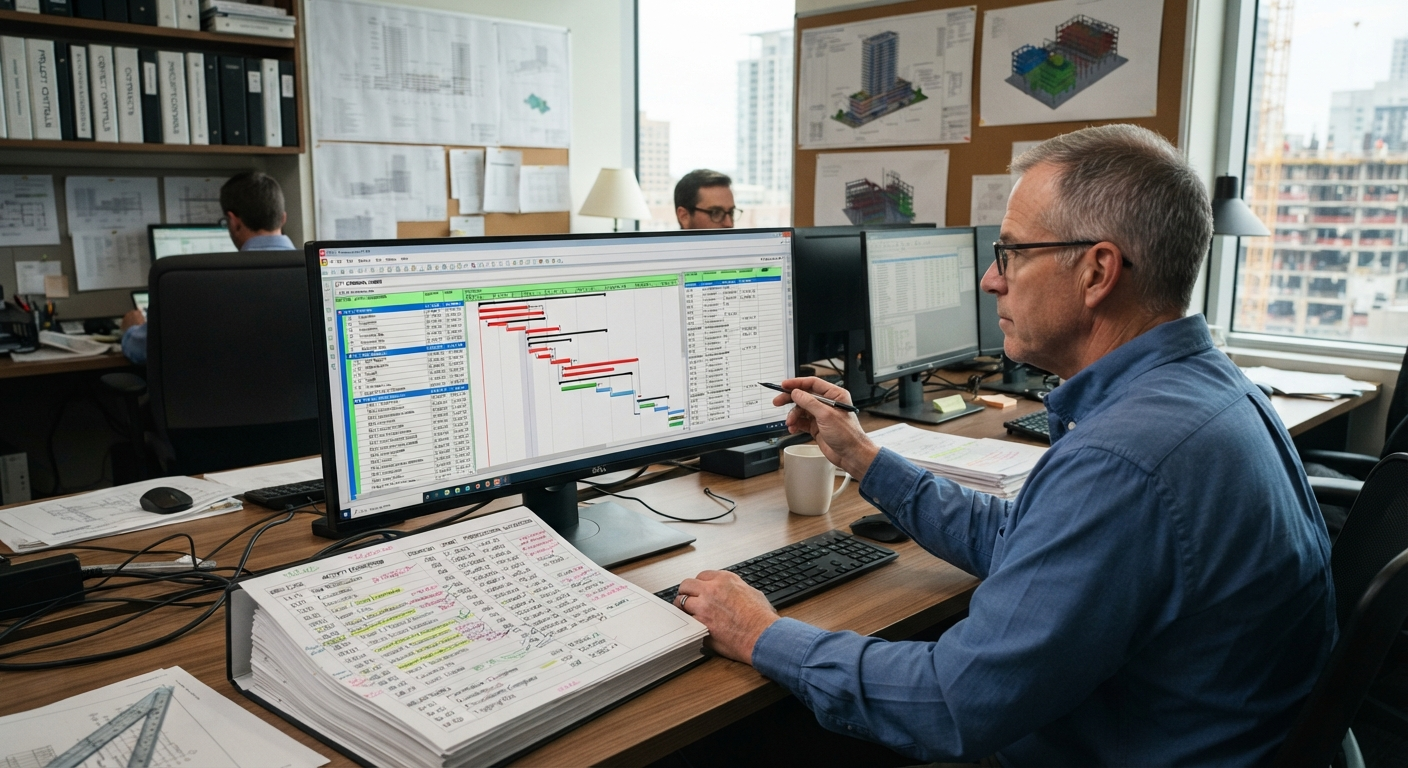
The scheduling software you choose matters less than the discipline behind it, but the right tool can make planning, coordination, and progress tracking much easier. In the US construction industry, different tools serve different project sizes and management needs.
| Tool | Best For | Key Strength |
|---|---|---|
| Primavera P6 | Large commercial, federal, and heavy civil projects | An industry-standard CPM scheduling tool that can handle complex projects with thousands of activities. |
| Microsoft Project | Mid-size general contractors (GCs) and construction management firms | Offers a familiar interface, reliable CPM scheduling capabilities, and straightforward owner reporting. |
| Procore | General contractors looking to combine scheduling with project management | Connects schedules with RFIs, submittals, daily logs, and other project management workflows. |
| Smartsheet / Monday.com | Small commercial and residential builders | Provides simple Gantt chart views and accessible collaboration features that subcontractors can easily follow. |
| Buildertrend | Custom home builders | Integrates construction schedules with client selections, budgets, and communication. |
Rule of Thumb: Match the software to the contract requirements and project complexity. If the owner specifies Primavera P6 in the scheduling submittal requirements, the decision is already made for you. Otherwise, choose a platform your team and subcontractors can use consistently to maintain accurate updates and keep everyone aligned.
Step 8: Baseline, Publish, and Communicate
Baselining locks the original schedule as your benchmark. Every update compares actual progress against it, which is how you produce the monthly reports owners and construction managers expect.
Publish it in formats people actually use:
- Gantt chart for the office and owner updates
- Two-week look-ahead for the field (detailed, trade-specific)
- Milestone summary for executives
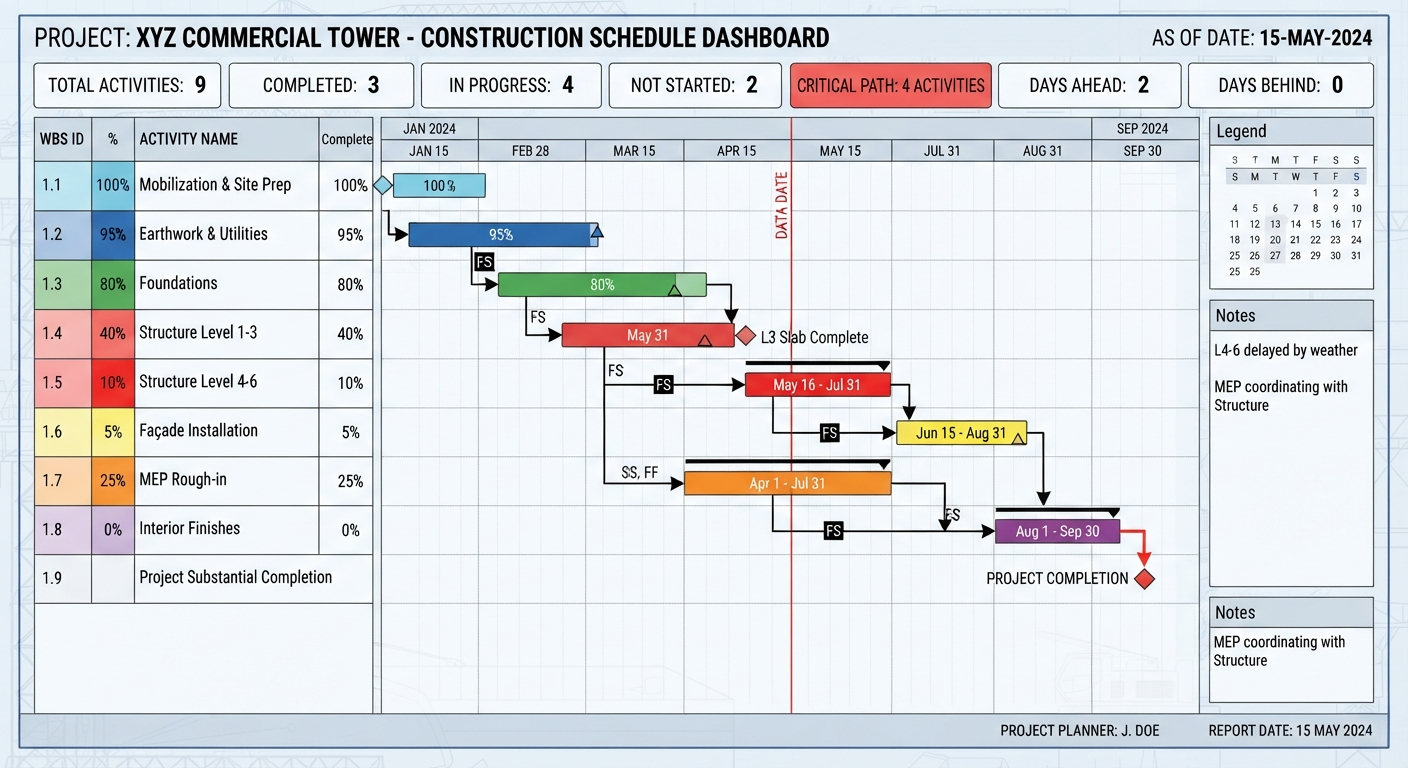
Walk the schedule with every subcontractor before mobilization. A sub who has verbally committed to their durations is far more accountable than one who received a PDF they never opened.
Step 9: Track, Update, and Recover
A schedule is a living document. Update it weekly:
- Record actual start/finish dates against planned dates.
- Re-estimate remaining durations honestly.
- Re-run the critical path to see whether it moves.
- Document delays with cause (weather, owner change, sub performance). This protects you contractually.
When you’re behind, the recovery playbook is short: add crews, work overtime, resequence activities to run in parallel where logic allows, or crash the critical path by bringing additional resources onto critical activities. Notice what isn’t on that list: “ask everyone to work harder” is not a schedule recovery method.
Common Mistakes When You Create a Construction Schedule
- Ignoring procurement. Long-lead items (switchgear, elevators, custom steel) must be on the schedule with real lead times, not placeholders.
- Too much detail. A 4,000-activity schedule on a $2M job is unmanageable. Match detail to project size.
- No weather logic. If you’re pouring flatwork in a northern state in December, your schedule needs to say so.
- Set-and-forget. A schedule updated monthly is archaeology, not management.
- Skipping pre-planning on structural trades. Projects that invest early in coordinated structural rebar detailing services consistently pour on schedule, because bar lists, fabrication, and inspection sequences are resolved before mobilization, not discovered at the jobsite trailer.
The Bottom Line
To create a construction schedule that actually works: scope it honestly, break the work down, estimate from production rates, sequence the dependencies, level your resources, find the critical path, baseline it, and then treat weekly updates as non-negotiable. Anyone serious about how to create a construction schedule that survives contact with reality will tell you the same thing: the schedule is only as good as the discipline behind it. Do that, and the schedule becomes the most valuable management tool on the job, not a binder that sits in the trailer.
The projects that finish on time are rarely the ones with luck. They are the ones where the hard thinking happened on paper, weeks before the first crew mobilized.
Need help keeping your structural work on schedule?
Engineering Geni’s construction scheduling services deliver accurate, well-structured project schedules that help contractors manage timelines, coordinate resources, and keep construction activities on track.
Talk to our team today and get a reliable construction schedule that keeps your project moving forward, minimizes delays, and supports timely project completion.
Frequently Asked Questions About How to Create a Construction Schedule
What is a construction schedule?
A construction schedule is a timeline that outlines project activities, start and finish dates, task dependencies, resource assignments, and key milestones. It helps contractors coordinate labor, materials, equipment, and subcontractors to complete projects on time and within budget.
How to create a construction schedule?
To create a construction schedule, define the project scope, build a Work Breakdown Structure (WBS), estimate activity durations, sequence tasks, assign resources, identify the critical path, establish a baseline, and track progress through regular updates.
What is the best software for construction scheduling?
The best construction scheduling software depends on project size and complexity. Primavera P6 is widely used for large commercial and heavy civil projects, Microsoft Project suits mid-size contractors, and Procore integrates scheduling with project management. Smartsheet and Buildertrend are also useful for smaller construction teams.
What is the critical path in a construction schedule?
The critical path is the longest sequence of dependent activities that determines the shortest possible project completion time. Any delay in a critical path activity can push back the entire project unless corrective action is taken.
What should a construction schedule cover?
A construction schedule should cover the entire project, from pre-construction and procurement through final inspections and closeout. Individual activities should generally be broken into manageable durations, often two weeks or less, to make progress tracking and schedule updates easier.
How often should a construction schedule be updated?
A construction schedule should typically be updated weekly to reflect actual progress, revised durations, material delays, and changing site conditions. Major commercial projects may also require formal monthly updates for owners and construction managers.
What is the difference between a construction schedule and a look-ahead schedule?
A construction schedule outlines the overall project timeline, including major activities, milestones, and completion dates. A look-ahead schedule focuses on upcoming work, usually over one to three weeks, helping field teams coordinate crews, materials, equipment, and daily tasks.
What causes construction schedule delays?
Common causes of construction schedule delays include material shortages, inaccurate duration estimates, weather conditions, failed inspections, design changes, labor shortages, and poor trade coordination. Early planning, realistic timelines, and regular schedule updates help contractors identify and address these risks before they affect project completion.